



Full View
Similar items
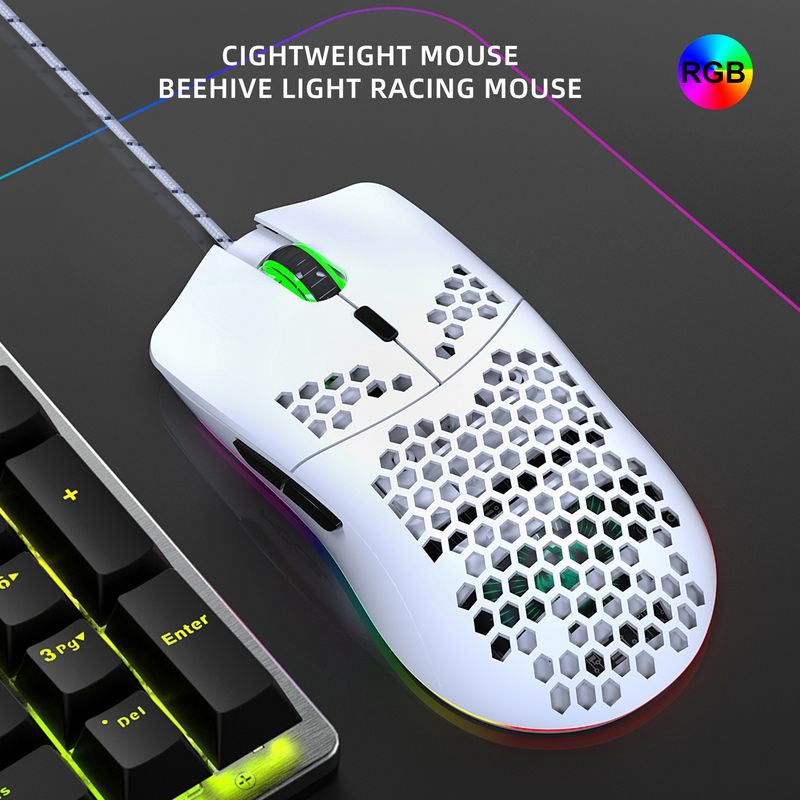
New Lightweight Hollow Gaming Wired Luminous Mouse Suitable For Laptops And Desktops
NZ$77.92NZ$141.06
Color : J900W-6400dpi white macro


Quantity :

Report
Include copyright infringementFree Standard Shipping. See details
Estimated between Sun, Jun 14 and Sat, Jun 20
You can return the product within 30 days of receipt. See details
Shop with confidence

Money Back Guarantee
Get the item you ordered or your money back. Learn more
About this item
Sourced from Aura Bits
Seller assumes all responsibility for this listing.Item number: 36910079
Item specifics
Origin
DE
Features
Rgb, Other, Single Light
Axis
Other, Optical Axis, Green Axis
Numeric Keypad
No, Yes
Product Type
Portable Mouse, Mute Mouse, Rechargeable Mouse
Connection
Wired
Size
<100Mm, >130Mm, 100Mm-120Mm
Certification
CE, UL, GS
Item description from the seller
Added wireless mouse versions, T66 in black and white, rechargeable wireless mouseYou can directly select and purchase through the link, or if you need English materials, consult customer service
J900 Product Packing List and Weight:
Cable length: 150 cm
Net weight of mouse: 95.6g
Mouse size: 13 * 6.6 * 4cm
Package weight: 148 g
Package size 14.8X9.8X5cm
Quantity of one box: 100
Box size: 55 * 52 * 32cm
Packing gross weight: 16.65kg
Download link for J900 macro programming software:
https://drive.google.com/file/d/1PYR7WgUaWbGpF387mnZrEsST1ezkuXsS/view?usp=sharing
Specifications:
Product model: J900 RGB Lighting Programmable Gaming Mouse
Rate of return: 125HZ
Moving speed: 28IPS
Rate: 4000FPS
Acceleration: 10G
Human body engineering design, comfortable grip, hollow design, more fashionable
6 programmable buttons
6 RGB lighting modes, can turn off the light
6-level adjustable DPI, Max 6400 DPI
Voltage rating / electric current: DC 5V / 100mA
USB plug and play
Sw
itch life: 20 million cycles
Cable length: 150cm
Item Weight: 96g
Item Size:13*6.7*3.8 cmL * W * H
Package Weight: 147g
Package Size: 15*9.8*5cm
Supports Windows 2000 / XP / win7 /win8 /win10 Vista 32bit IOS or latest
Packing list
t:
1 x gaming mouse
1 x User manual
How to use:
1.Download the macro programming software through the website provided by the seller
2.After downloading, open it directly and use the buttons to customize the programming
3. When the mouse is successfully connected and used normally, open the J300 macro programming software directly to use the macro programming function
4.Adopt professional game chip, using high-performance program control decoder chip
for smooth motion and precise control
5.Button settings For the 1-6 buttons as shown, the drive supports custom settings
6.DPI setting: default 1000/1600/2400/3200/4800/6400 the six-segment DPI value can be adjusted
be any section
7. Light mode: RGB marquee effect, up to 6 lighting patterns
available
signs, the light can be
turned off
8.Mouse parameters: You can set the pointer precision, wheel speed, and double-click speed
9.Custom Settings: Custom macro editing that supports game effects
10.When the settings are complete, click Applications and then c
Click Save Configuration. You should restart the driver the next time you use it so that you can use all the customization features


Videos
Videos for this product

 4.4 out of 5 based on 9,249 reviews